Linux集群系统时间同步

前言

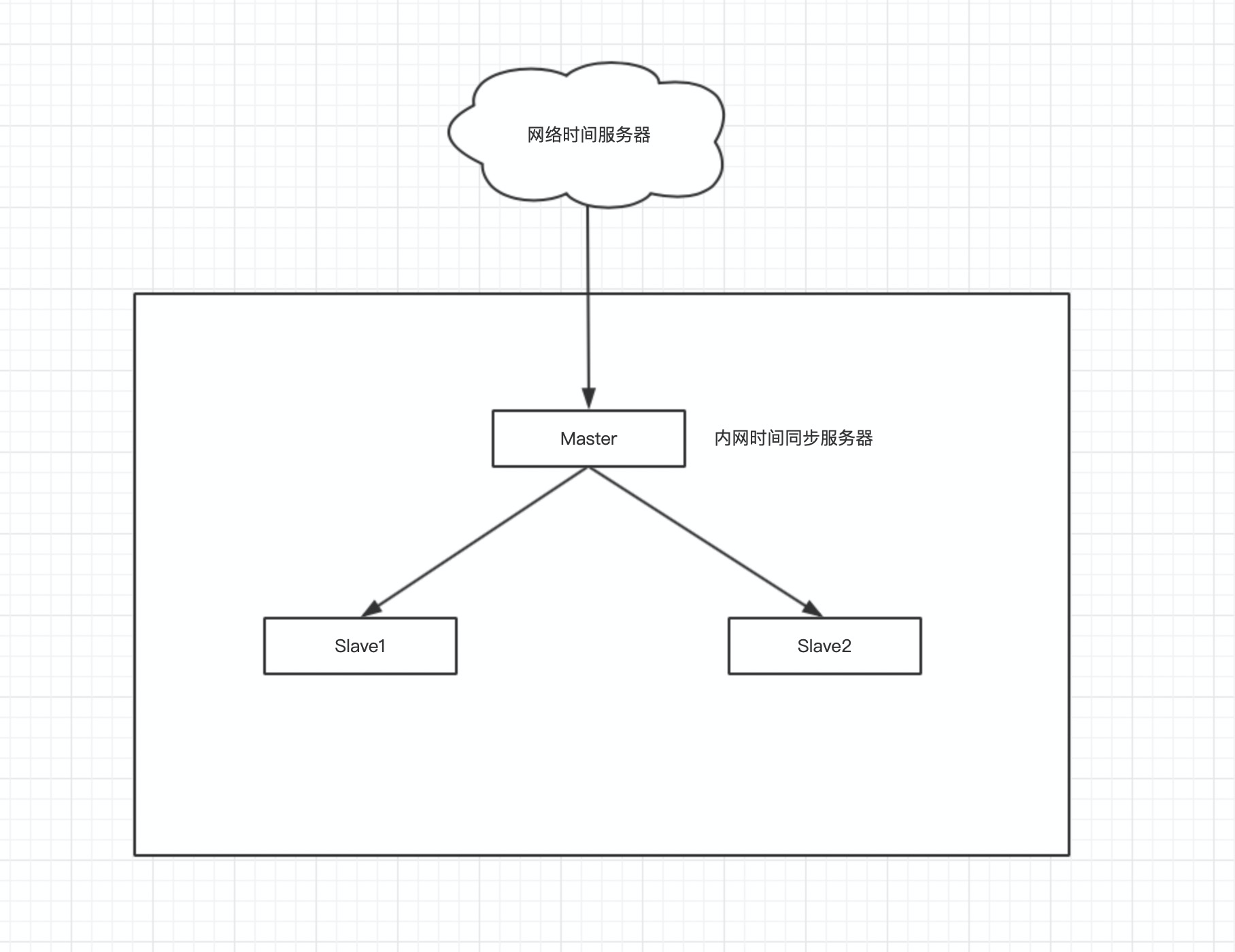
最近学习大数据相关的知识,在学习以及搭建Hbase的时候,发现slave的机器服务器起不来,经过排查,发现是集群时间不同步的问题,借此记录一下集群做时间同步的一些解决方案.

集群配置

Host 操作系统 IP
master Centos7 10.211.55.8
slave1 Centos7 10.211.55.9
slave2 Centos7 10.211.55.10

Master的作用

1、Master向外网时间服务器同步时间,如中国国家授时中心服务器。这里列举几个时间同步服务器:
美国标准技术院时间服务器:time.nist.gov(192.43.244.18)
上海交通大学网络中心NTP服务器地址:ntp.sjtu.edu.cn(202.120.2.101)
中国国家授时中心服务器地址:cn.pool.ntp.org(210.72.145.44)

2、Master作为内网时间服务器,为内网中的其他服务器提供时间同步服务,具体的架构图如下图所示。
Master的配置

1、安装NTP服务

1
[root@master ~]# yum install -y ntp

2、修改配置文件

1
2
3
4
5
6
7
8
9
10
11
12
13
14
15
16
17
18
19
20
21
22
23
24
25
26
27
28
29
30
31
32
33
[root@master ~]# vim /etc/ntp.conf
driftfile /var/lib/ntp/drift

restrict default kod nomodify notrap nopeer noquery
restrict -6 default kod nomodify notrap nopeer noquery
restrict 127.0.0.1
restrict -6 ::1

# 允许10.211.55.0网段内的所有机器从这台服务器同步时间
restrict 10.211.55.0 mask 255.255.255.0 nomodify notrap

# 配置中国国家中心授时服务器
server 0.cn.pool.ntp.org
server 1.cn.pool.ntp.org
server 2.cn.pool.ntp.org
server 3.cn.pool.ntp.org

# 允许上层时间服务器主动修改本机时间
restrict 0.cn.pool.ntp.org nomodify notrap noquery
restrict 1.cn.pool.ntp.org nomodify notrap noquery
restrict 2.cn.pool.ntp.org nomodify notrap noquery
restrict 3.cn.pool.ntp.org nomodify notrap noquery

# 外部服务器不可用时,以本地时间作为时间服务
server 127.0.0.1
fudge 127.0.0.1 stratum 10

# 同步时间后,同步到系统硬件时钟中
SYNC_HWCLOCK=yes

includefile /etc/ntp/crypto/pw
keys /etc/ntp/keys
disable monitor

3、开启ntpd服务,并开机启动

1
2
[root@master ~]# systemctl start ntpd
[root@master ~]# chkconfig ntpd on

4、查看ntp的服务状态

1
2
3
4
[root@master ~]# ntpstat 
synchronised to NTP server (119.28.206.193) at stratum 3
time correct to within 76 ms
polling server every 128 s

注意,启动ntp服务后一般,5-10分钟才能看到正常信息,否则在会显示服务正在启动中。

slave的配置

Slave1和Slave2作为需要同步时间的客户端,向master同步时间。以下为Slave的安装及配置。

1、安装ntp服务

1
[root@master ~]# yum install ntp -y

2、修改配置文件

1
2
3
4
5
6
7
8
9
10
11
12
13
14
15
16
17
18
19
20
21
22
23
24
[root@master ~]# vim /etc/ntp.conf
driftfile /var/lib/ntp/drift

restrict default kod nomodify notrap nopeer noquery
restrict -6 default kod nomodify notrap nopeer noquery
restrict 127.0.0.1
restrict -6 ::1

# 配置时间同步服务器为内网中master机器
server 10.211.55.8

# 允许master主动修改本机时间
restrict 10.211.55.8 nomodify notrap noquery

# 外部服务器不可用时,以本地时间作为时间服务
server 127.0.0.1
fudge 127.0.0.1 stratum 10

# 同步时间后,同步到系统硬件时钟中
SYNC_HWCLOCK=yes

includefile /etc/ntp/crypto/pw
keys /etc/ntp/keys
disable monitor

3、手动同步时间

我这里是添加了host文件,所以直接用host,如果你没有添加host,需要把master换成master的ip地址。

1
[root@master ~]# ntpdate -u master

4、启动时间同步服务,并设置开机启动

1
2
[root@master ~]# systemctl start ntpd
[root@master ~]# chkconfig ntpd on

结束

到此集群的时间同步服务已经搭建完成,Hbase也已经可以正常启动了。